
Your Questions, Answered
We’ve put together answers to some of the most common questions about the Reluxe Stereo and our services. If you need anything else, feel free to get in touch.
Fitting & Dimensions
Does the Reluxe Stereo fit my car? Can I fit it myself?
We’ve designed the Reluxe Stereo for a straightforward setup. It features a universal mounting cage and a standard 16-pin ISO harness for 'plug and play' compatibility in most vehicles with a 1-DIN slot.
Note: Designed for 12V negative earth systems. If your classic uses a 6V system or is positive earth, a voltage converter or polarity adapter will be required.
What are the physical dimensions and weight?
- Front Panel: W 188mm x H 60mm x D 8.5mm
- Console Unit: W 178mm x H 50mm x D 140mm
- Total Weight: Approx. 1.35 kg
- Audio Output: 45W x 4 (Standard) / 60W x 4 (Maximum)
 Figure 1.1: Reluxe Stereo Dimension
What connectors and antennas provided with the unit?
There are two accessories boxes included in the Reluxe Stereo package:
- Antenna Box: GPS antenna; 4G LTE antenna; Sim Catridge; Wi-Fi antenna; DAB aerial.
- Cable Box: Aux connector; RCA output connector; USB A extending port; Camera connector; ISO Power Cord.
How do I securely mount the unit to my car?
Push in the side clips, insert the mounting cage into your car’s DIN slot, and bend the metal teeth outward to lock the cage in place. Slide in the Reluxe Stereo until it clicks.
Pro-Tip: If the cage feels loose, bend additional metal teeth (b) on the top/bottom. For downward-facing dashboards, consider applying tape around the unit for extra grip before sliding it in.
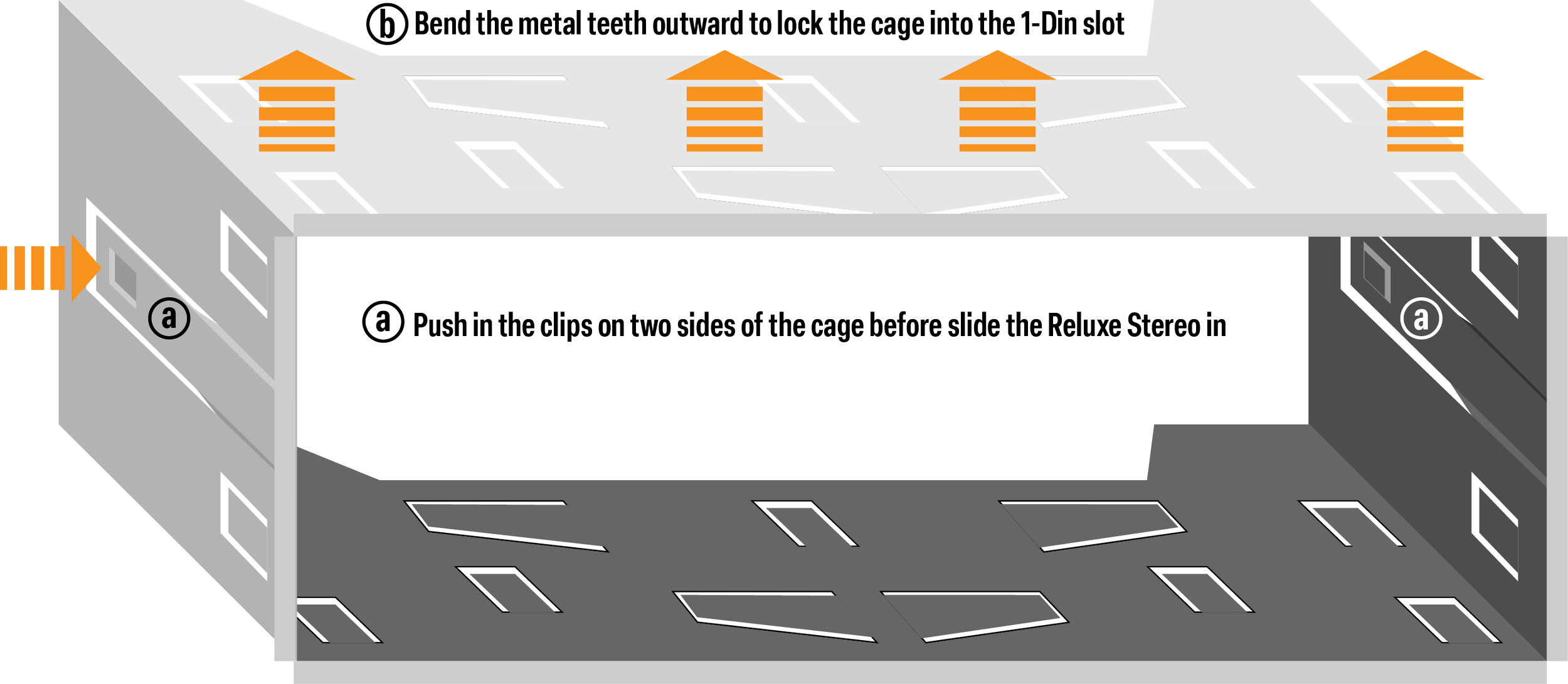 Figure 1.2: Universal DIN Mounting Cage Guide
What is the ISO harness for and how do I connect it correctly?
The ISO harness included the power cord, speaker wires and wires for other core functions of the Reluxe Stereo. If your vehicle has a modern ISO connector, just plug in and you are all set. For custom setups, match the 16 wires using our color-coded guide below:
- Brown (Key 1 & 2): Steering wheel controls
- Pink: Reverse light (triggers reverse camera)
- Blue: Electric antenna control
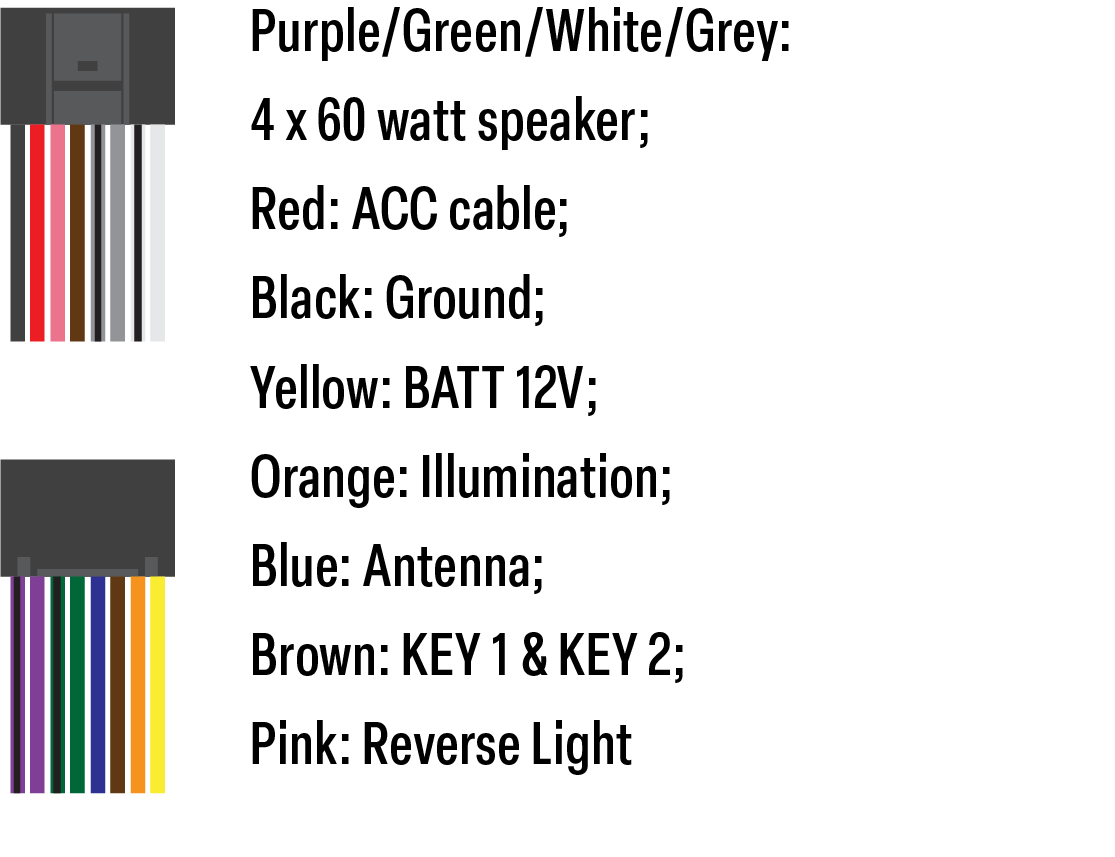 Figure 1.3: 16-Pin ISO Connector Pin-out
DAB Antenna Setup & Grounding.
To ensure stable reception, follow the three-part grounding process:
- Part A (Grounding): Press the metal tab firmly against the car’s bare metal frame.
- Part B (Antenna): Attach the film to a clear area of the windshield.
- Part C (Connector): Plug directly into the DAB port on the rear of the unit.
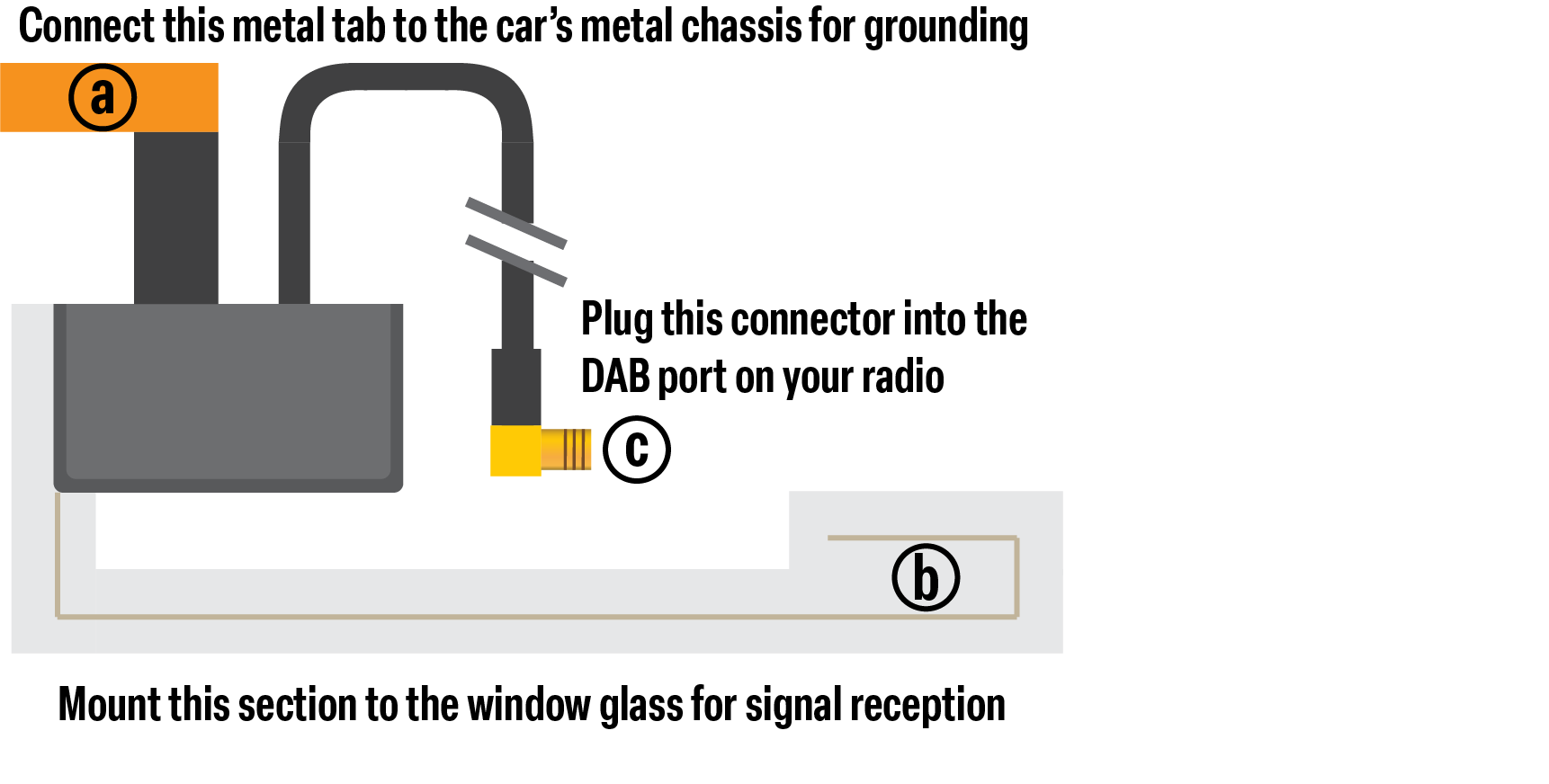 Figure 1.4: Grounding and Placement Guide
When do I need the 4G antenna and sim catridge?
The 4G connectivity is only needed if you using the system default navigation application without having your phone connected. In order to connect to 4G network, you'll need to correctly connect the provided 4G antenna and sim card catridge, insert your own data only sim card to the catridge.* ** ***
* To ensure stable connection, do not tuck away the 4G antenna under metal enclosure, i.e. not under bonnet.
** Data only sim card is not included.
*** GPS antenna is required to use the built in navigation application.
When do I need the GPS antenna?
It's advice to set up the GPS antenna correctly when you install the Reluxe Stereo. As GPS signal is required to operate built in navigation app and automatically update date and time from satelite. Some upcoming feature would also require the GPS antenna in order to function correctly.
* To ensure stable connection with the satelite, the GPS antenna MUST see the sky. We advice you to locate it on top of the dashboard or stick onto the windshiled
Features & Software
What connectivity and sensors are included?
Software: Apple CarPlay™, Android Auto™, DAB/FM/AM, and Google Maps.
Hardware: Bluetooth 5.0, Wi-Fi 6, NFC™, and two 2A USB-C ports (PD Fast Charge). Includes Gyroscope, Accelerometer, and GPS receiver. Supports GMS via SIM cartridge.
How do I interact with the interface?
The unit features a 4.8-inch multi-touch screen and two signature 5-way precision control dials (scroll, click, and 2-way tilt).
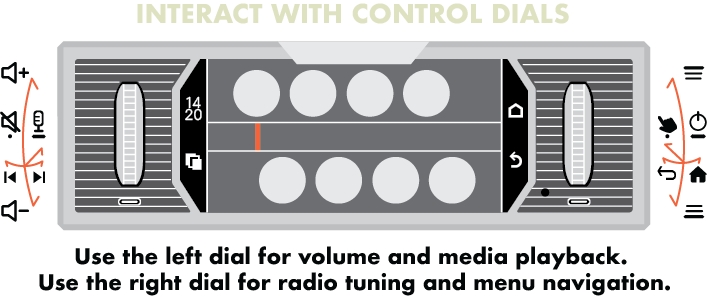 Figure 2.1: 5-Way Control Dial Mapping
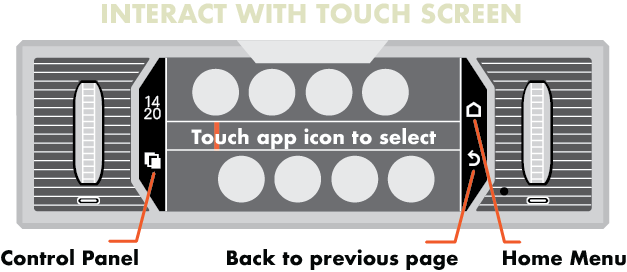 Figure 2.2: Touch Screen Interactive Mapping
What is "Analogue Mode" via the Smart Cover?
The Smart Cover uses an integrated NFC chip to shift the interface into a period-correct "Analogue Mode." You maintain tactile control over volume and tracks via the dials, while essential metadata remains visible through the cover's viewing aperture.
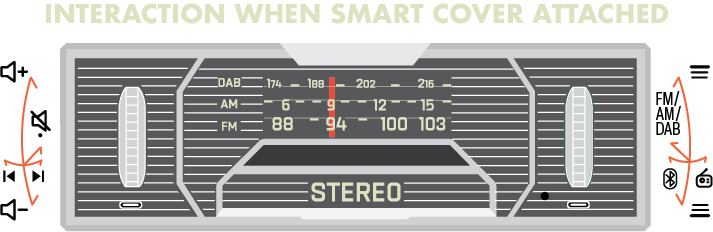 Figure 2.3: 5-Way Control Dial Mapping With Smart Cover Attached
How to connect to a reverse camera?
The Reluxe Stereo support connections to reverse camera with AHD 720p and AHD 1080p specification.
For reverse camera function, you need to connect the camera to the Reluxe Stereo with the video cord marked REVERSE in the Cable Box. And in order to automatically trigger the reverse camera when you shift into reverse gear, you'll need to connect the REVERSE wire from ISO harness to the reverse light positive wire.
Pro-Tip: If the image not showing properly, you can adjust the camera setting in SETTING > GENERAL > REVERSE CAMERA.
 Figure 2.4: Reluxe reverse camera connection
Is my phone compatible with CarPlay and Android Auto?
The Reluxe Stereo supports both Apple CarPlay™ and Android Auto™. Use the quick reference table below to check your device compatibility:
| Connection Type | Apple CarPlay™ | Android Auto™ |
|---|---|---|
| Wired Connection | iPhone Do not support |
Android phone Running Android 9.0 or higher |
| Wireless Connection | iPhone 5 or newer Running iOS 9.0 or higher |
Android phone with 5GHz Wi-Fi Running Android 11.0 or higher |
| Not Supported | iPads, iPod Touch | Android "Go" Edition devices, Android Tablets |
Pro-Tip: If you are using a wired setup, Android Auto is highly sensitive to cable quality. We strongly recommend using the original high-quality USB cable that came with your phone, or a certified high-speed data transfer cable.
Troubleshoots
DAB auto cross region search procedure
For longer journey across multiple regions, ie long distance classic car rally, you need to refresh the DAB list to keep receiving local stations. When you entered a new region, sometimes re-scan can take longer than it should, and may stuck in 97%. In this case, you can simply reboot the system, and perform the scan again.
Customisation & Service
Can I customise the Reluxe products?
Yes. Our bespoke service allows for everything from name engravings to custom panel designs. Learn more here.
Shipping, Warranty & Support
Shipping: UK Express (£10) / Global Express (£50).
3-Year Factory Warranty: Covers all hardware manufacturing defects.
5-Year Support & Updates: Direct access to experts and Over-the-Air (OTA) software updates.